Skip to content

Site is (almost) back...

Sorry for the downtime of this site - until around a week ago I hosted my home page on a trusty Genesi Pegasos II system (powered by a PowerPC G4 Processor clocked at 1GHz, using Debian 4.0 PPC with 512 MB of RAM), serving these pages from my home DSL connection. Unfortunately this system provided no means of redundancy - the hard disk drive died.

Luckily I perform frequent backups, so I moved most parts of the site to a shared hosting space now - the picture gallery is unfortunately too big to fit into the space that I have there. I'll try to move the pictures into my Flickr account instead, but this will take some time.

Note that the primary domain name of this site is now lenzg.net - lenzg.org, (the domain that I tried to promote as the official domain for my site) used to redirect to the home machine at lenz.homelinux.org. Both now redirect to the new address instead. I've initiated the move of the lenzg.org domain to the other provider as well, so soon this site will be available from both the .org and .net domain. Please don't link to lenz.homelinux.org anymore, as that site will eventually go out of service. Until then, a small openSUSE Linux box (Intel PIII, 500 MHz, 192 MB of RAM) running lighttpd will perform the URL redirection.

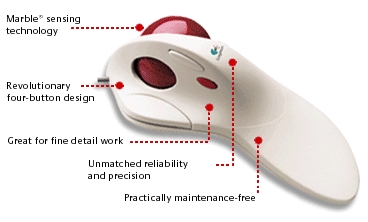
Reviving my old Logitech TrackMan Marble FX

Logitech TrackMan Marble FX

I am probably different than most users, but I am a a fan of unusual input devices. I prefer Laptops with trackpoints - I immediately disabled the touchpads on my Lenovo laptops (a T61 and T42) in the BIOS when I received them. My first Laptop (a Toshiba Portege 3440CT) didn't even have a touchpad to begin with. It's a pity that trackpoints seem to a dying breed.

And I don't like using regular mice on my desktop, either! Actually, my most favourite input device is a trackball - I purchased a Logitech TrackMan Marble FX a long time ago, and used it for years. Then computers stopped having serial or PS/2 connectors, and I replaced the trackball with an USB mouse. I never really got the hang of using mice, but Logitech (or other vendors) somehow never came up with a suitable replacement model for the Marble FX with a USB port. I recently looked at the Logitech Trackman Optical, but was not convinced by the reviews I read, and the fact that it requires batteries (a trackball is a stationary device, so a cable does not really interfere here!). The Microsoft Trackball Explorer might have been an option, but it seems to be impossible to get nowadays.

After experimenting with several mouse models (Cherry, Microsoft), I decided to revive the TrackMan Marble again. It comes with a PS/2-connector by default, so I first tried to connect it to my PC using a PS/2-to-USB converter dongle. This actually worked without any tweaking, but had two limitations: the fourth mouse button was not detected anymore (I could have lived with that) and the Trackball stopped responding after it had been idle for a while, requiring me to restart the X server to get it working again.

So using the PS/2-to-USB dongle was ruled out and I tried an Serial-to-USB dongle instead:

lenz@thebe:~> lsusb|grep Serial
Bus 002 Device 006: ID 067b:2303 Prolific Technology, Inc. PL2303 Serial Port

When plugged in, udev creates a new serial device /dev/ttyUSB0 which I needed to inform the X server about. Fortunately it's possible to define multiple input devices in the xorg.conf configuration file. Using the serial port actually had another advantage - I was able to add some trackball-specific tweaks that would have collided with the settings of the "regular" PS/2 mouse section that I needed for the builtin trackpoint of my Thinkpad. It required some tweaking and testing, but this is what I added to xorg.conf to be able to use the TrackMan Marble FX in addition to the builtin pointing device:

Section "ServerLayout"
    Identifier     "Layout0"
    Screen      0  "Screen0" 0 0
    InputDevice    "Keyboard0" "CoreKeyboard"
    InputDevice    "Mouse0" "CorePointer"
    InputDevice    "Trackball" "SendCoreEvents"
    Option         "Clone" "off"
    Option         "Xinerama" "off"
EndSection

Section "InputDevice"
    Driver       "mouse"
    Identifier   "Trackball"
    Option       "Device" "/dev/ttyUSB0"
    Option       "Name" "TrackMan Marble FX"
    Option       "Protocol" "Intellimouse"
    Option       "Vendor" "Logitech"
    Option       "AngleOffset" "10"
    Option       "Buttons" "8"
    Option       "Emulate3Buttons" "off"
    Option       "EmulateWheel" "true"
    Option       "EmulateWheelButton" "8"
    Option       "YAxisMapping" "4 5"
    Option       "EmulateWheelInertia" "8"
EndSection

You may wonder about the 8 mouse buttons, as the device only has four physical buttons. Interestingly, the fourth button on the TrackMan reported itself as "button 8" when I probed it with "xev", so I needed to make sure the server is aware of it. When pressed, the trackball now acts like a mouse wheel and allows me to quickly scroll across long documents - very handy! Now I just hope that the button switches in the TrackMan last for another while - until some vendor eventually comes up with a suitable replacement...

Hot-swapping the CD-ROM drive in my Thinkpad T42 UltraBay with SUSE Linux 10.1

While browsing the fabolous ThinkWiki pages I stumbled over this little gem: the lt_hotswap kernel module finally allows me to eject the CD-ROM drive in my Thinkpad T42's UltraBay without having to shut down Linux first. This module makes sure that the device is properly unregistered from the kernel's device list. Now I can replace it with e.g. a second battery on the fly and don't have to shutdown the OS completely! The installation on my SUSE Linux 10.1 system was quite easy: after downloading the source tarball from the SourceForge.net download page I performed the following commands:
tar zxvf lt_hotswap-0.3.6.tar.gz
cd lt_hotswap-0.3.6
make
sudo make install
sudo rcacpid restart
modprobe lt_hotswap

You need to have the kernel-source package installed, as well as the gcc compiler, of course. Now when I eject the little lever that allows me to pull out the CD-ROM drive from the UltraBay, the following message appears in /var/log/messages:

lt_hotswap: Requesting IDE eject!
lt_hotswap: Attempting to eject

Now the CD-ROM drive can be safely pulled from the UltraBay and e.g. exchanged with an additional battery. Inserting the battery yields the following kernel message:

kernel: ACPI: Battery Slot [BAT1] (battery present)

The battery info also appears in /proc/acpi/battery and is fully operational. Unfortunately battery monitoring tools like KPowersave or gkrellm don't display the second battery, but at least the kernel is happily using it. I can remove the battery again, but this event does not seem to get registered properly - the second battery remains visible in /proc/acpi/battery, but shows zero capacity and the "present" state does not change. But at least replacing the CD-ROM drive with the battery now workes fine, which was my major concern. And it is still possible to re-insert the CD-ROM drive again:

kernel: ide1: BM-DMA at 0x1868-0x186f, BIOS settings: hdc:pio, hdd:pio
kernel: Probing IDE interface ide1...
kernel: hdc: HL-DT-STCD-RW/DVD DRIVE GCC-4242N, ATAPI CD/DVD-ROM drive
kernel: ide1 at 0x170-0x177,0x376 on irq 15
kernel: hdc: ATAPI 24X DVD-ROM CD-R/RW drive, 2048kB Cache, UDMA(33)

If you want to enable the lt_hotswap module at bootup, you need to add its name to the MODULES_LOADED_ON_BOOT variable in the /etc/sysconfig/kernel configuration file.

If your Laptop uses an external docking station to host a CD-ROM drive, there are some good news for you: according to Andreas Jaeger's blog, the upcoming openSUSE 10.2 will actually provide a generic Dockutils framework that will support docking/undocking functionality for different laptops and vendors. It will be interesting to find out if this covers UltraBay devices as well.
All hail S.M.A.R.T. and external USB hard disk drives!

Long time no post! Last Sunday I spotted the following email in my junk mailfolder:
Date: Sun, 21 May 2006 19:08:39 +0200
From: root <root@metis.lenznet>
To: <lenz@localhost.metis.lenznet>
Subject: SMART error (OfflineUncorrectableSector) detected on host: metis

This email was generated by the smartd daemon running on:

host name: metis
DNS domain: lenznet
NIS domain:

The following warning/error was logged by the smartd daemon:

Device: /dev/hda, 1 Offline uncorrectable sectors

For details see host's SYSLOG (default: /var/log/messages).

You can also use the smartctl utility for further investigation.
No additional email messages about this problem will be sent.
Which did not sound too good. In addition to that, the system had failed to resume from a suspend to disk earlier that day - the kernel experienced disk read errors while trying to load the suspended image from the swap partition. Fortunately a fresh reboot still worked and I ran a more thorough analysis of the disk drive by using smartctl -t long /dev/hda. Using various Open Source tools from a SUSE Linux 10.1 rescue system (which boots off the first installation CD) helped me to backup and restore my data without losing anything (except for some time, of course). Continue reading "All hail S.M.A.R.T. and external USB hard disk drives!"

Using a DVB-T USB stick on SUSE Linux 10.0

A few days ago I received a neat little gadget: a Yakumo QuickStick DVB-T, which allows me to watch TV via the USB-2 port on my Thinkpad. Amazon sold it for 52 EUR, so I could not resist, after making sure that it was listed in the list of supported devices on the very informative LinuxTV Wiki pages. All what was left to be done for me was to download the firmware and putting it into /lib/firmware. The driver and firmware were loaded automatically when I plugged in the device:
Mar 20 19:44:05 metis kernel: usb 1-4: new high speed USB device using ehci_hcd and address 8
Mar 20 19:44:05 metis kernel: dvb-usb: found a 'WideView WT-220U PenType Receiver (and clones)' in cold state, will try to load a firmware
Mar 20 19:44:05 metis kernel: dvb-usb: downloading firmware from file 'dvb-usb-wt220u-01.fw' to the 'Cypress FX2'
Mar 20 19:44:05 metis kernel: dvb-usb: WideView WT-220U PenType Receiver (and clones) successfully initialized and connected.
Mar 20 19:44:07 metis kernel: usb 1-4: USB disconnect, address 8
Mar 20 19:44:07 metis kernel: dvb-usb: generic DVB-USB module successfully deinitialized and disconnected.
Mar 20 19:44:08 metis kernel: usb 1-4: new high speed USB device using ehci_hcd and address 9
Mar 20 19:44:08 metis kernel: dvb-usb: found a 'WideView WT-220U PenType Receiver (and clones)' in warm state.
Mar 20 19:44:08 metis kernel: dvb-usb: will use the device's hardware PID filter (table count: 15).
Mar 20 19:44:08 metis kernel: DVB: registering new adapter (WideView WT-220U PenType Receiver (and clones)).
Mar 20 19:44:08 metis kernel: DVB: registering frontend 0 (WideView USB DVB-T)...
Mar 20 19:44:08 metis kernel: dvb-usb: schedule remote query interval to 300 msecs.
Mar 20 19:44:08 metis kernel: dvb-usb: WideView WT-220U PenType Receiver (and clones) successfully initialized and connected.
Now I fired up the KDE video player Kaffeine 0.7.1 and configured it to scan for available channels. That's all there was to it! I am positively surprised.

Thinkpad update: stuck in an endless loop?

This is too funny. I decided to do some housekeeping on my Thinkpad T42 Laptop and checked the installed driver and firmware versions against the latest updates available from the Thinkpad web pages.

Currently, my Laptop's BIOS version is 3.12 (latest version available: 3.19), the Embedded Controller is at version 3.03 (latest version available: 3.04).

The BIOS README tells me:

- This BIOS version will only work with Embedded Controller Program
Version 3.04 (or higher). Please obtain the additional package,
Embedded Controller Program Version 3.04 (or higher),
and update Embedded Controller Program in the system with it.
- If you need to update Embedded Controller Program as well as the BIOS,
update the BIOS first.

OK, so I guess I need to update the Embedded Controller Firmware first. However, the README for the Controller Update tells me:

- This version of Embedded Controller Program will only work with BIOS
Version 3.13 (or higher). Please obtain the additional package, BIOS
Version 3.13 (or higher), and update the BIOS in the system with it.
- If you need to update the BIOS as well as the Embedded Controller
Program, update Embedded Controller Program first.

I think it's time to make use of my extended service contract and call their hotline. Or do I really have to update the BIOS from 3.12 to 3.13 first, then update the embedded controller to 3.04 before I can apply the latest BIOS update to 3.19? This is insane.

tweetbackcheck