Skip to content

Interview with Adam Donnison, web developer at MySQL.com

It has not hit the MySQL DevZone Frontpage yet, but I just finished an interview with Adam Donnison, one of our web gurus behind the mysql.com web site.

Adam talks about what his work environment looks like, his experiences with MySQL 5.1 on the MySQL web sites and why he enjoys working for a virtual organization like ours. Enjoy!

Using a serial mouse via USB on OpenSolaris

As noted in my previous blog posting, I manged to revive my old Logitech TrackMan Marble FX on Linux (openSuSE 11.1b4), using a Serial-to-USB dongle with a Prolific PL2303 chip. But I also use OpenSolaris on my Laptop quite frequently (currently testing the upcoming 2008.11 release), so I investigated if it would be possible to enable the trackball there as well.

Luckily, the Driver Manager listed the plugged in adapter and the correct driver (usbsprl) was loaded already. Now the real challenge was finding out which device node to use. Some research revealed that the driver actually comes with a manual page , which indicated that /dev/term/0 was the correct device name.

Lo and behold, I copied the InputDevice section from my Linux xorg.conf file into the OpenSolaris one, replaced the Device parameter with the appropriate one and restarted the X server. Immediate success! Now I can enjoy using my most favourite input device on OpenSolaris as well.

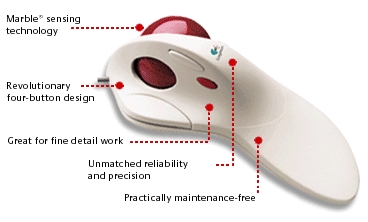
Reviving my old Logitech TrackMan Marble FX

Logitech TrackMan Marble FX

I am probably different than most users, but I am a a fan of unusual input devices. I prefer Laptops with trackpoints - I immediately disabled the touchpads on my Lenovo laptops (a T61 and T42) in the BIOS when I received them. My first Laptop (a Toshiba Portege 3440CT) didn't even have a touchpad to begin with. It's a pity that trackpoints seem to a dying breed.

And I don't like using regular mice on my desktop, either! Actually, my most favourite input device is a trackball - I purchased a Logitech TrackMan Marble FX a long time ago, and used it for years. Then computers stopped having serial or PS/2 connectors, and I replaced the trackball with an USB mouse. I never really got the hang of using mice, but Logitech (or other vendors) somehow never came up with a suitable replacement model for the Marble FX with a USB port. I recently looked at the Logitech Trackman Optical, but was not convinced by the reviews I read, and the fact that it requires batteries (a trackball is a stationary device, so a cable does not really interfere here!). The Microsoft Trackball Explorer might have been an option, but it seems to be impossible to get nowadays.

After experimenting with several mouse models (Cherry, Microsoft), I decided to revive the TrackMan Marble again. It comes with a PS/2-connector by default, so I first tried to connect it to my PC using a PS/2-to-USB converter dongle. This actually worked without any tweaking, but had two limitations: the fourth mouse button was not detected anymore (I could have lived with that) and the Trackball stopped responding after it had been idle for a while, requiring me to restart the X server to get it working again.

So using the PS/2-to-USB dongle was ruled out and I tried an Serial-to-USB dongle instead:

lenz@thebe:~> lsusb|grep Serial
Bus 002 Device 006: ID 067b:2303 Prolific Technology, Inc. PL2303 Serial Port

When plugged in, udev creates a new serial device /dev/ttyUSB0 which I needed to inform the X server about. Fortunately it's possible to define multiple input devices in the xorg.conf configuration file. Using the serial port actually had another advantage - I was able to add some trackball-specific tweaks that would have collided with the settings of the "regular" PS/2 mouse section that I needed for the builtin trackpoint of my Thinkpad. It required some tweaking and testing, but this is what I added to xorg.conf to be able to use the TrackMan Marble FX in addition to the builtin pointing device:

Section "ServerLayout"
    Identifier     "Layout0"
    Screen      0  "Screen0" 0 0
    InputDevice    "Keyboard0" "CoreKeyboard"
    InputDevice    "Mouse0" "CorePointer"
    InputDevice    "Trackball" "SendCoreEvents"
    Option         "Clone" "off"
    Option         "Xinerama" "off"
EndSection

Section "InputDevice"
    Driver       "mouse"
    Identifier   "Trackball"
    Option       "Device" "/dev/ttyUSB0"
    Option       "Name" "TrackMan Marble FX"
    Option       "Protocol" "Intellimouse"
    Option       "Vendor" "Logitech"
    Option       "AngleOffset" "10"
    Option       "Buttons" "8"
    Option       "Emulate3Buttons" "off"
    Option       "EmulateWheel" "true"
    Option       "EmulateWheelButton" "8"
    Option       "YAxisMapping" "4 5"
    Option       "EmulateWheelInertia" "8"
EndSection

You may wonder about the 8 mouse buttons, as the device only has four physical buttons. Interestingly, the fourth button on the TrackMan reported itself as "button 8" when I probed it with "xev", so I needed to make sure the server is aware of it. When pressed, the trackball now acts like a mouse wheel and allows me to quickly scroll across long documents - very handy! Now I just hope that the button switches in the TrackMan last for another while - until some vendor eventually comes up with a suitable replacement...

Adding multimedia support to OpenSolaris

I recently installed the last  release candidate version of OpenSolaris 2008.11 (ISO image available from here) and I am happy to note that the audiohd driver now supports the Intel soundchip (82891H) in my Lenovo Thinkpad T61 out of the box! This was one of the glitches I observed with 2008.05. In general, I am very impressed by the OpenSolaris driver support for this particular laptop - everything except for bluetooth is supported now. On the downside, suspending to RAM still fails for me, but I have not looked into this very deeply yet.

But what good is a working sound driver, if you don't have apps that produce sounds? Be default, the media players included in the distribution lack support for most codecs, e.g. MP3 or video formats. This is not much different from most Linux distributions, as these codecs are usually protected by patents or proprietary licenses which require the user to install these separately. Here are some hints on how to enable better multimedia support on OpenSolaris.

The Observatory has a detailed article on how to add the free MP3 gstreamer codec from Fluendo, so all applications that use the gstreamer API (e.g. Songbird) will be able to play back MP3 files.

If you want full multimedia support and an choice of video players/codecs, you should add the Life With Solaris (LWS) package repository to the package manager:

$ pfexec pkg set-authority -O http://pkg.lifewithsolaris.jp:10000/ pkg.lifewithsolaris.jp
$ pfexec packagemanager

You will now be able to choose a new package repository from the dropdown list, which allows you to select players and codecs for download/installation. The packages will be installed in /opt/LWS, so you need to add /opt/LWS/bin to your $PATH, if you want to start the applications from the command line. But the packages will create menu entries for the GNOME desktop as well.

Enjoy!

New MySQL User Group in Los Angeles founded

I am happy to announce that there now is a MySQL User Group in Los Angeles, California! Their first meetup will take place on Nov. 19th at 7:30pm, Carl Gelbart will give a presentation about "Infobright, an Open Source Data Warehouse". The location has not been finalized yet, it seems: Sun offered them to choose between one of their locations in Universal City, El Segundo or Irvine. Thanks a lot to Joe Devon for stepping up and volunteering to organize this group, it's appreciated!

And if you are not able to join the LA MySQL User Group because you live somewhere else - take a look at http://mysql.meetup.com/ for a local MySQL User Group in your area! If there isn't one yet, have you considered organizing one by yourself? It's easy and fun and we will actually sponsor the Meetup.com fees for you! Also take a look at the MySQL Forge Wiki for some hints on how to create and run a user group (and make sure to add your own findings and experiences to these pages).

tweetbackcheck